Loading
Description
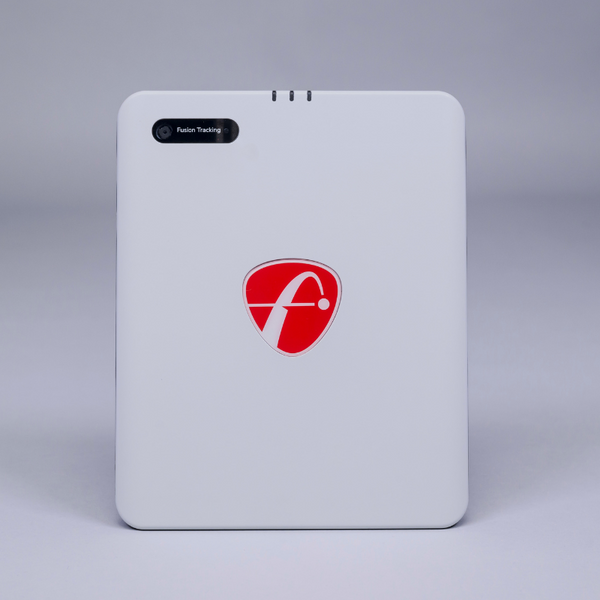
The FlightScope Mevo Gen2 Launch Monitor is the ultimate all-in-one launch monitor, delivering unmatched performance and unbeatable value in its price range. Designed for versatility, it serves as an affordable indoor simulator, a portable solution for the driving range, or a simple net setup in your backyard. Mevo Gen2 is powered by patented Fusion Tracking Technology, combining 3D Doppler Radar and synchronized image processing to provide precise and reliable data for every swing.
Enjoy a lightweight and portable device with up to 6 hours of battery life, USB-C fast charging, and seamless setup for both indoor and outdoor use. With no required subscriptions, hidden fees, or annual license costs, users benefit from free FS Golf software for iOS, Android, and PC, as well as a skills app for iOS and Android.
Professional-grade features include the acclaimed FlightScope Shot Tracer, action video clips with data overlays, and the ability to share 3D swing trajectories effortlessly. The Mevo Gen2 also comes with a lifetime E6 Connect Simulation Bundle, featuring 8 world-renowned golf courses for immersive practice and play.
What's Included:
- FlightScope Mevo Gen2 Launch Monitor
- Quick Start Guide
- Power Supply
- USB-C to C Cable
- Hard Shell Case
- (100) Aluminum Stickers
Free Software:
- FS Golf Practice App for iOS, Android, and PC
- FS Skills Challenges App for iOS and Android
- E6 Connect (8) Course Bundle for iOS and PC
1. Kiawah Ocean Course: SC, USA
2. Torrey Pines South Course: CA, USA
3. Sea Island Seaside Course: GA, USA
4. Latrobe Country Club: PA, USA
5. Pelican Hill Golf Club: CA, USA
6. Chateau Whistler Golf Club: BC, Canada
7. Valderrama Golf Club: Cádiz, Spain
8. Kapalua Golf Club - Plantation Course: HI, USA
Features
Patented Fusion Tracking Technology
Combines 3D Doppler Radar with synchronized image processing for superior accuracy and consistency.
FlightScope Shot Tracer
Records and displays 3D swing trajectories with data overlays, delivering a professional TV broadcast experience for every shot.

Action Video Clips With Data Overlay
Automatically records and saves swing videos, overlaying shot data and allowing users to annotate and add voice comments.

Lightweight And Portable
Easy to transport and set up for both indoor and outdoor use with a robust 6-hour battery life and USB-C charging.

Free Software
No subscriptions or hidden fees—enjoy FS Golf software and skills app on multiple devices at no additional cost.
Lifetime E6 Connect Simulation Bundle
Play on (8) world-renowned golf courses on iOS and PC with exclusive simulation access.
3rd Party Integrations
Seamlessly connects with top golf software and training systems, enhancing the overall user experience.
What's Included
Included with Your Purchase:
- FlightScope Mevo Gen2 Launch Monitor
- Quick Start Guide
- Power Supply
- USB-C to C Cable
- Hard Shell Case
- (100) Aluminum Stickers
Free Software:
- FS Golf Practice App for iOS, Android, and PC
- FS Skills Challenges App for iOS and Android
- E6 Connect (8) Course Bundle for iOS and PC
1. Kiawah Ocean Course: SC, USA
2. Torrey Pines South Course: CA, USA
3. Sea Island Seaside Course: GA, USA
4. Latrobe Country Club: PA, USA
5. Pelican Hill Golf Club: CA, USA
6. Chateau Whistler Golf Club: BC, Canada
7. Valderrama Golf Club: Cádiz, Spain
8. Kapalua Golf Club - Plantation Course: HI, USA
What's Measured
The FlightScope Mevo Gen2 Launch Monitor provides (18) full swing, chipping, and putting data parameters for a complete picture of your golf performance. These include carry distance, total distance, ball speed, club speed, spin rate, launch angle, and more - delivering the insights you need to improve every aspect of your game.

Specifications
- Dimensions: 6.9"H x 1.2"D x 5.6"W
- Weight: 17.6 ounces
- Batteries: Rechargeable Li-ion battery (included)
- Battery Life: 6 Hours
- Charging Port: USB-C
- 3rd Party Software Integrations: E6 Connect, Creative Golf 3D, The Golf Club, Awesome Golf, GSPro
- Additional Integrations: TheStack System, SuperSpeed, RCT Balls, Apple Watch
System Requirements
FS Golf App Requirements:
iOS
Minimum:
- System: iOS 17 or newer
- iPad: 8th Gen / Mini 6th Gen / Air 5th Gen / Pro 4th Gen or newer
- iPhone: XR / XS / 11 or newer
Recommended:
- System: iOS 18
- iPad: iPad Pro 6th or 7th Gen
- iPhone: 15 Pro / 16 Pro or newer
Android
Minimum:
- System: Android 10 or newer
- Processor: Snapdragon 865 / Exynos 990 or equivalent
- RAM: 8 GB
Recommended:
- System: Android 11 or newer
- Processor: Snapdragon 8 Gen 1 / Exynos 2200 or equivalent
- RAM: 12 GB or more
Windows
Minimum:
- OS: Windows 10 or 11 (64-bit)
- CPU: Intel Core i3-13100 / Ryzen 5 5560 or higher
- RAM: 8 GB DDR4 or higher
- Storage: 128 GB (at least 10 GB free space)
Recommended:
- OS: Windows 10 or 11 (64-bit)
- CPU: Intel Core i5-10210 / Ryzen 5 5600 or higher
- RAM: 16 GB DDR4 or higher
- GPU: Intel UHD Graphics / Radeon Graphics or better (compatible with DirectX 11)
- Storage: 256 GB (at least 10 GB free space; SSD recommended)
Space Requirements
Indoor Setup Requirements:
- Tee to Impact Screen Minimum Required Distance: 8'
- Unit to Tee Required Distance: 8'
*Aluminum stickers or Titleist RCT balls are required for indoor use
Outdoor Setup Requirements:
- Unit to Tee Required Distance: 8' with unrestricted ball flight
Additional Setup Restrictions:
Mevo Gen2 is designed to operate in most environments. However, certain appliances and equipment can create restrictions that can interfere with the performance and accuracy of the Mevo Gen2 data. Some common objects are:
- Airconditioners
- Fluorescent lights
- Fans
- Fridges
- TV's, laptops, desktop computers in front of the Mevo Gen2
- Signal towers
FAQ
Q: What is the battery life of the FlightScope Mevo Gen2?
A: The device provides up to 6 hours of battery life with convenient USB-C charging.
Q: Do I need a subscription for the FS Golf software?
A: No, there are no required subscriptions, hidden fees, or annual license fees for the included software.
Q: Which golf courses are included in the E6 Connect Simulation Bundle?
A: The bundle includes Kiawah Ocean Course, Torrey Pines Golf Course, Sea Island Seaside Course, Latrobe Country Club, Pelican Hill Golf Club, Chateau Whistler Golf Club, Valderrama Golf Club, and Kapalua Golf Club – Plantation Course.
Q: Is the Mevo Gen2 compatible with other golf software and training systems?
A: Yes, it integrates with E6 Connect, Creative Golf 3D, The Golf Club 2019, Awesome Golf, GSPro, TheStack System, SuperSpeed, RCT Balls, and Apple Watch.
Q: What setup is required for indoor and outdoor use?
A: Indoors use requires 8 ft minimum from tee to impact screen and 8 ft from unit to tee. Aluminum stickers or Titleist RCT golf balls are required for indoor use. Outdoors use requires 8 ft from unit to tee with unrestricted ball flight and no stickers needed.
Q: What unique features set Mevo Gen2 apart?
A: Patented Fusion Tracking Technology, professional video overlays, action video clips, and a lifetime simulation bundle are just some of the features that set Mevo Gen2 apart.
Resources
Documents: